


As you all know, Google Adsenseis that one monetization stream which all bloggers love. It is one of safest and the best ways of monetizing your blog and generating 100s or even 1000$ a day if you work hard on your blog. However, getting approved by Google Adsense is not always easy. Don’t worry, this article will teach you how to apply for Google Adsense the correct way.
1. How to apply for Google Adsense the right way
Try to blog from a custom domain rather than a free domain and a custom email-ID
Google ranks custom domains much higher than the free blogger or BlogSpot domains. So, it is better to buy a good custom domain in the relevant niche. Most domain provides sell custom domains for as low as 2-3$ these days so it is not a huge investment.
After creating the domain, create a custom email ID for the domain like example@domain.com. Most domain providers give a free option of creating a custom email-ID when you buy the domain name.
After creating the domain, create a custom email ID for the domain like example@domain.com. Most domain providers give a free option of creating a custom email-ID when you buy the domain name.

2. Use an SEO friendly theme and work on the blog’s loading time.
The next step is to design a blog which will appeal to your readers. Google wants its users to get a good reading experience when going through a blog and this will work in your favour.
A neat theme which is easy to navigate is preferable as compared to a complex theme which makes the content difficult to read. The site loading time is an important factor in the eyes of Google when deciding the ranking of your website. Install plugins which boost the loading time and remove unwanted junk which slow down the site.
A neat theme which is easy to navigate is preferable as compared to a complex theme which makes the content difficult to read. The site loading time is an important factor in the eyes of Google when deciding the ranking of your website. Install plugins which boost the loading time and remove unwanted junk which slow down the site.

3. Add at least 40 original and keyword-rich articles to your blog if you want to apply for Google Adsense
Once you get a custom domain and install a good theme, add highly informational content. Content is the most important criteria in the eyes of Google when it comes to getting Adsense approval. This is one of the most overlooked criteria but is the most common reasons for Adsense rejection.
First things first, do not take a shorter route and publish copied content. Google is very strict when it comes to plagiarised content and detects it without any fail.
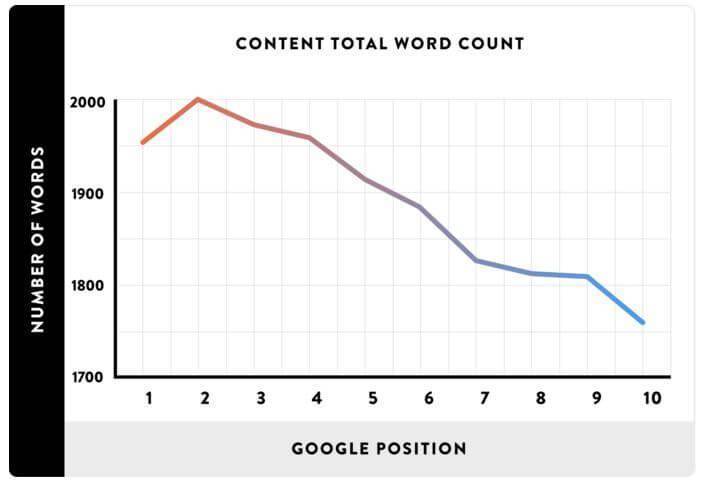
The second thing is the length of the articles which is more important than the number of articles. The length of the articles should be more than 1000 words each and preferably 2000 words. Between two blog with one blog having 20 articles of 1000 words each and another one having 50 articles of 500 words each, Google is going to rank the blog with 20 articles higher as it has rich content.
First things first, do not take a shorter route and publish copied content. Google is very strict when it comes to plagiarised content and detects it without any fail.
The second thing is the length of the articles which is more important than the number of articles. The length of the articles should be more than 1000 words each and preferably 2000 words. Between two blog with one blog having 20 articles of 1000 words each and another one having 50 articles of 500 words each, Google is going to rank the blog with 20 articles higher as it has rich content.
4. Add Privacy Policy, About us, Disclaimer, contact us pages to your website
Google wants to know your identity and the benefit you are going to provide to its users before approving your website for Adsense. These pages make the website look professional and add to the reading experience of the users. In the ‘Contact Us’ section, provide the custom email-ID which you created earlier.
There are many good templates available online for privacy policy and disclaimer but remember to modify the template to suit your website. Do not just copy and paste it.
There are many good templates available online for privacy policy and disclaimer but remember to modify the template to suit your website. Do not just copy and paste it.
5. Avoid adding any third party ads to your website before Adsense.
Resist the temptation to add third-party ads or affiliate links on your blog if you want to apply for Google Adsense. Adsense doesn’t clearly mention that you cannot use other ads. However, it is better to keep away from these ads till Google approves your website.
6. Integrate the Google Analytics code to your website and add your site to Google webmaster tools
Register your website on Google Analytics and integrate the analytics code on the page of your website to actively track your website statistics. This gives an idea that you are serious about your statistics and track them regularly. Hence, Google considers this to be a trusting piece of information. Submit your website to Google webmaster tools and verify your website after this to improve the credibility of your domain further in the eyes of Google.

7. Create and submit an XML sitemap to Google
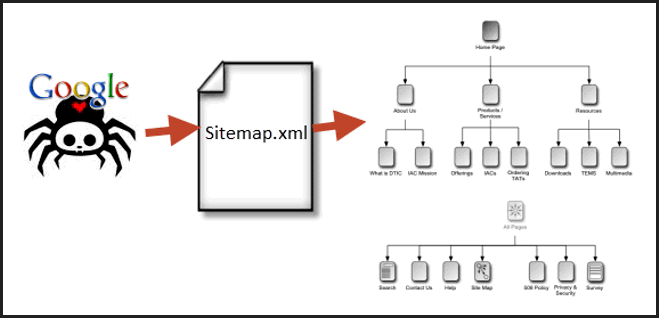
Do you want to make your website trustworthy? Then, create a sitemap of your website. This makes it easier for Google bots to crawl your website faster. It just takes a few seconds to generate an XML sitemap. There are many Sitemap plugins for you to choose from. If you are a wordpress user, the Google XML sitemaps plugin is the best choice.
8. Focus on getting Traffic to your blog and update it frequently
(Recommended Reading: 14 tips to help you sell more with less traffic and Traffic CASE STUDY)
Most new website owners think that after creating a website and posting content, they can now sit and wait for traffic to flow. This is sadly not the case anymore.
With Google updating its algorithms frequently, it is becoming more and more difficult to get traffic to your blog if you are not consistent in publishing content on your blog. Write new content and update old posts so that Google knows that your website is active. This is the first step in getting traffic to your blog
Create backlinks by commenting on other blogs with meaningful comments to improve your ranking in search results which will increase your traffic significantly.
Most new website owners think that after creating a website and posting content, they can now sit and wait for traffic to flow. This is sadly not the case anymore.
With Google updating its algorithms frequently, it is becoming more and more difficult to get traffic to your blog if you are not consistent in publishing content on your blog. Write new content and update old posts so that Google knows that your website is active. This is the first step in getting traffic to your blog
Create backlinks by commenting on other blogs with meaningful comments to improve your ranking in search results which will increase your traffic significantly.

9. Work on improving your Alexa rank
Earlier, Google’s Page rank used to be the measuring criteria for checking a website’s authority on the internet.
Page rank is no longer a criterion. So most publishers and Google also look at the Alexa ranking of the website to gauge its authority. Using the tips mentioned above will build your Alexa rank slowly but steadily. Install the Alexa toolbar on your computer and monitor it constantly to see how your website is performing.
Page rank is no longer a criterion. So most publishers and Google also look at the Alexa ranking of the website to gauge its authority. Using the tips mentioned above will build your Alexa rank slowly but steadily. Install the Alexa toolbar on your computer and monitor it constantly to see how your website is performing.

Wait for at least 6 months before submitting your site to Google
Last but not the least, even if you are done with all these steps and cannot wait for Google to start displaying ads on your website, it is important that you wait for a few months before you apply for Google Adsense.
Your chances of rejection are very high if you submit a new domain. Google policies mention that it is good to wait for at least 6 months. This makes Google see you as someone who is more concerned about the monetization of your website rather than someone who wants to give an enriching experience to its readers. Focus on improving your traffic and blog authority in these 6 months. If you do that, your application will get approved in the first go!
Your chances of rejection are very high if you submit a new domain. Google policies mention that it is good to wait for at least 6 months. This makes Google see you as someone who is more concerned about the monetization of your website rather than someone who wants to give an enriching experience to its readers. Focus on improving your traffic and blog authority in these 6 months. If you do that, your application will get approved in the first go!
So this is a sure shot step-by-step guide that will get your website an Adsense approval definitely. These tips will make your blog look like an important website for both your readers and Google.
Please do not fall for shortcuts as this can land your site in trouble. Start with one basic fundamental thing if you want to apply for Google Adsense. A blog which is loved by its readers will also be loved by Google. If you create a blog keeping your readers in mind, getting Adsense approval is as easy as eating a piece of cake.
Please do not fall for shortcuts as this can land your site in trouble. Start with one basic fundamental thing if you want to apply for Google Adsense. A blog which is loved by its readers will also be loved by Google. If you create a blog keeping your readers in mind, getting Adsense approval is as easy as eating a piece of cake.
Next: Recommended reading – Google Adsense Tips – 5 Tips to double your google adsense earnings
If you liked reading this blog post, please share it with your friends so that they can benefit from it too. I would love it too 🙂


 Posts
Posts


Comments
Post a Comment